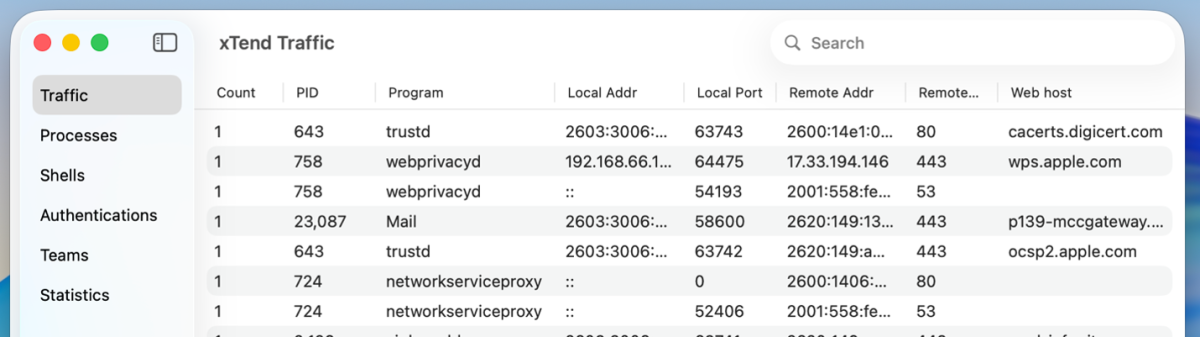
Observe the hidden activity in your Mac with Ennetix xTend! Get real-time insights into what programs are connecting where, how programs are started, and more.
Downloading programs
Begin with Ennetix xTend from Apple’s App Store, and when you are ready, enhance xTend with Ennetix Endpoint.
xTend leverages Ennetix’s advanced network system extension along with an optional Ennetix endpoint system extension to uncover hidden processes, undetectable connections, and critical program information.
Want to know where your data is going, even when encrypted? xTend has got you covered.
Curious about which organizations are behind the programs running on your computer? xTend will tell you.
Want to know what your laptop is doing at 2 am, when it is unplugged, asleep, and in its laptop bag? Yes, really. Your Mac is active all the time. Find out with xTend.
For even deeper analysis, record all data to rotating log files that can be analyzed by custom tools or forwarded to a SIEM.
Key Features:
Monitor all connections attempts, even encrypted connections.
Identify the programs behind the connections.
Identify organizations behind running programs.
Track program distribution methods.
Track activity over time.
Optional Extension:
Taking security to another dimension, the optional Ennetix Endpoint system extension significantly elevates xTend’s capabilities. When installed, you gain:
Detailed provenance of program executions.
Insights into transient programs that run momentarily.
Monitor commands from the Terminal app and remote SSH logins.
View programs initiated via shell scripts.
Record authentication events including unlocking methods (Password, Apple Watch, Touch ID).
By offering all these features, Ennetix xTend provides unprecedented observability into the secret life of your Mac.
How the systems work together
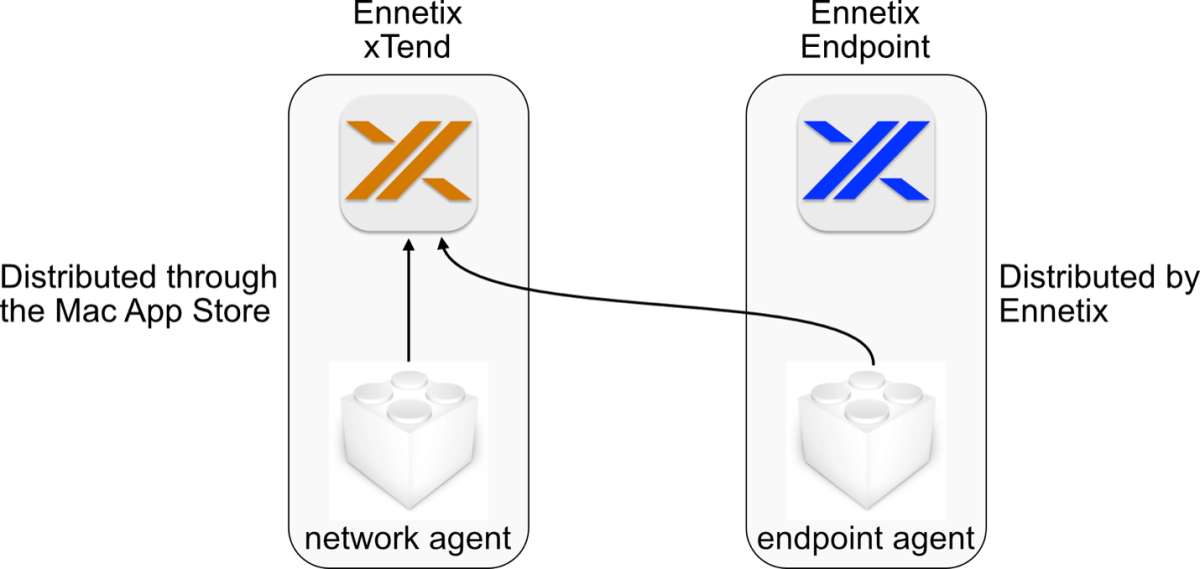
Ennetix xTend is bundled with a network agent. Once the network agent is installed, xTend receives notifications of network attempts, gathers additional information, presents the information, and optionally logs the data to rotating log files.
Ennetix Endpoint is bundled with an endpoint agent.
After installing the endpoint agent, restart your xTend program, and xTend will now receive information from both the network and endpoint agents. This dramatically improves your visibility into what is happening on your Mac.
Jim Olson served as a Business Specialist at the Engineering Translational Technology Center (ETTC) at University of California, Davis, advising on company formation, strategy,and financing. He also taught classes as an Adjunct Faculty in the Graduate School of Management at UC Davis for over a decade. Previously, he was Executive Vice President of video compression systems at TANDBERG Television and CEO of SkyStream. At TANDBERG, he focused on building and marketing video compression offerings. Jim has held leadership roles at 3Com Corporation and Hewlett-Packard, where he led several successful product launches. He is an active angel investor and a guest lecturer at Stanford University and UC Davis. Jim holds a BSEE from UC Davis, and MSEE and MBA degreesfrom Santa Clara University.
Sudip Nandy is an acclaimed business leader with over 30 years of experience in global strategy, enterprise building, and investments. He is currently a Senior Advisor and has previously served as Managing Director and Operating Partner at ChrysCapital, a leading investment firm. He was Executive Chairman of Infogain Corporation and Board Member at Liquid Hub Inc. Sudip is also a Director on the Board of GeBBS Healthcare. Earlier, he was CEO and Chairman (India) for Aricent. He is the former Chief Strategy Officer and Head of M&A at Wipro, where he led several successful mergers and acquisitions. Sudip holds a Bachelor’s Degree in Physics from the Indian Institute of Technology (IIT), Kharagpur, andanother in Electrical Technology and Electronics from the Indian Institute of Science (IISc),Bengaluru. He also has an MBA from the Indian Institute of Management (IIM), Ahmedabad.
Prem Jain was CEO and Co-Founder of Pensando Systems, a cloud and enterprise data center startup, which was founded in 2017 and acquired by AMD in 2023. Before Pensando, Prem spent 23 years at Cisco Systems, where he was known as the “heart, soul, and brains” behind several successful startups. As the Senior Vice President and General Manager of Insieme BU, he developed Software Defined Networking (SDN/ACI) products and next-generation data-center switches. Prem joined Cisco in 1993 after it acquired Crescendo Communications, where he was Vice President of Systems Architecture. He holds a B.E. from Birla Institute of Technology and Science (BITS), Pilani, and a Master’s in Electrical and Computer Engineering from University of California, Davis.
CHIEF PRODUCT OFFICER (ACTING)
Ashok Madanahalli
Ashok Madanahalli brings 30+ years of experience in networking and cybersecurity at industry leaders such as Riverbed, Check Point, Extreme Networks, and FORE Systems where he built and led high-performance teams delivering product and market share leadership. At Riverbed, Ashok served as Vice President of Product Management (WAN Optimization and SD-WAN) leading the business transformation to Cloud and SaaS. He has also led Firewall/VPN/UTM and IDS/IPS solutions. Ashok holds a master’s degree in engineering from University of Oklahoma and a bachelor’s degree from National Institute of Technology, Durgapur, India.
FOUNDER AND DIRECTOR OF ENGINEERING
Trevor Gudmundsen
Trevor leads Ennetix’s efforts on full-stack design and development of the company’s analytics pipeline. He manages the operations of Ennetix platforms across its customer base.
Todd pioneered the field of network security monitoring in the 1990s with the development of the first widely deployed intrusion detection system, the Network Security Monitor (NSM). In addition to network-based security, he has developed intrusion detection sensors for Windows, Linux, and macOS. Todd is currently focused on bringing innovative network and endpoint security monitoring solutions to Ennetix’s xVisor platform.
Pulak Chowdhury, Founder and CTO, Ph.D., Computer Science, UC Davis
Pulak brings a unique combination of deep networking technology background with advanced research work in Computer Sciences. He provides overall architectural direction and drivers the development activities on xVisor with a highly talented team.
Prof. Dr. Bis Mukherjee, Founder and President (also Distinguished Professor, UC Davis), Ph.D., Electrical Engineering, University of Washington, Seattle, B.Tech. (Hons.), Electronics Engineering, Indian Institute of Technology, Kharagpur
Acknowledged authority in pioneering network technologies for 35+ years. His pioneering contributions in the networking world include:
Network Intrusion Detection System (1990)
Firewall (1989)
Dynamic bandwidth allocation for EPON/FTTH (2002)
Optical-wireless integration (2007), now 5G Fronthaul